9. Archive Templates and the Card Pattern
Build archive pages for Movies and People, and create an adaptive card pattern that renders differently based on post type. This lesson combines templates and patterns into one hands-on exercise.
Learning Outcomes
- Be able to build archive templates with Query Loop, Post Template, and pagination.
- Know how patterns work as template composition tools.
- Understand how PHP conditionals in patterns can adapt output.
- Know the difference between a pattern used for starter content and one used for template composition.
Tasks
1. Update the Movie Archives template
We created placeholder archive templates in Lesson 3. Now we'll refine them.
It is often much easier to make changes to template files visually using the Site Editor and you are welcome to do so here. However, since we only need to change a couple of things, it may be a good exercise to work on editing a template manually.
Open templates/archive-tenup-movie.html and make three changes:
- Remove the placeholder heading (
<!-- wp:heading -->Archive: Movies<!-- /wp:heading -->) - Change the Query attributes from
"order":"desc","orderBy":"date"to"order":"asc","orderBy":"title" - Change the Post Template attribute
minimumColumnWidthfrom"21rem"to"13rem"so the cards fit more per row
Your updated template should look like this:
<!-- wp:template-part {"slug":"header","tagName":"header"} /-->

<!-- wp:group {"tagName":"main","style":{"spacing":{"margin":{"top":"0","bottom":"0"},"padding":{"top":"var(--wp--preset--spacing--32-48)","bottom":"var(--wp--preset--spacing--32-48)"}}},"layout":{"type":"constrained"}} -->
<main class="wp-block-group" style="margin-top:0;margin-bottom:0;padding-top:var(--wp--preset--spacing--32-48);padding-bottom:var(--wp--preset--spacing--32-48)">

    <!-- wp:query {"queryId":0,"query":{"perPage":9,"postType":"tenup-movie","order":"asc","orderBy":"title","inherit":true},"align":"wide"} -->
    <div class="wp-block-query alignwide">

        <!-- wp:post-template {"layout":{"type":"grid","columnCount":null,"minimumColumnWidth":"13rem"}} -->

            <!-- wp:pattern {"slug":"tenup-theme/base-card"} /-->

        <!-- /wp:post-template -->

        <!-- wp:query-pagination {"paginationArrow":"arrow","align":"wide"} -->
            <!-- wp:query-pagination-previous /-->
            <!-- wp:query-pagination-next /-->
        <!-- /wp:query-pagination -->

    </div>
    <!-- /wp:query -->

</main>
<!-- /wp:group -->

<!-- wp:template-part {"slug":"footer","tagName":"footer"} /-->
2. Update the Person Archives template
Make the same changes to templates/archive-tenup-person.html.
You could even copy and paste templates/archive-tenup-movie.html directly to archive-tenup-person.html and it would still work.
This is because the Query attributes set "inherit":true which means it will use context from the WP heirarchy and ignore the postType attribute here.
However to avoid confusion, it is still recommended to set the proper postType attribute.
3. Evolve the card pattern
The scaffold ships a simple patterns/card.php with a featured image, title, date, and category. We'll evolve it to handle multiple post types using PHP conditionals.
The outer card structure (wrapping Group, featured image, post title) is shared across all post types. Only the inner content changes based on get_post_type():
$post_type = get_post_type();
$is_movie  = 'tenup-movie' === $post_type;
$is_person = 'tenup-person' === $post_type;

// Shared: outer Group with is-clickable-card, 2:3 featured image, post title (isLink:true)

// Then conditionally:
if ( $is_movie ) :
    // Viewer rating row (block binding) + "Trailer" button
elseif ( ! $is_movie && ! $is_person ) :
    // Post date + post terms (default blog content)
endif;

if ( $is_movie || $is_person ) :
    // Secondary button: "Trailer" for movies, "View More" for persons
endif;
Copy the complete patterns/card.php from the fueled-movies theme. The key design decisions:
- One shared card layout -- every post type gets the same outer Group (
is-clickable-card,2:3image,10pxradius,12pxpadding, background color). Only the content inside varies. isLink: trueon the post title makes the heading a link, which serves as the primary clickable target for accessibility (screen readers announce the post title).- Movie-specific viewer rating row uses a block binding (
viewerRatingLabelTextNumberOnly) that won't exist until Lesson 10. It will show empty until then. - Movie/person button: movies show "Trailer," persons show "View More" via a PHP ternary. Blog posts get no button.
- Blog-specific metadata: post date and category terms only render for non-movie, non-person post types.
All three archive templates reference the same pattern:
<!-- wp:pattern {"slug":"tenup-theme/base-card"} /-->
One pattern, three templates. The PHP conditionals run in the context of each post inside the query loop, so the card automatically adapts.
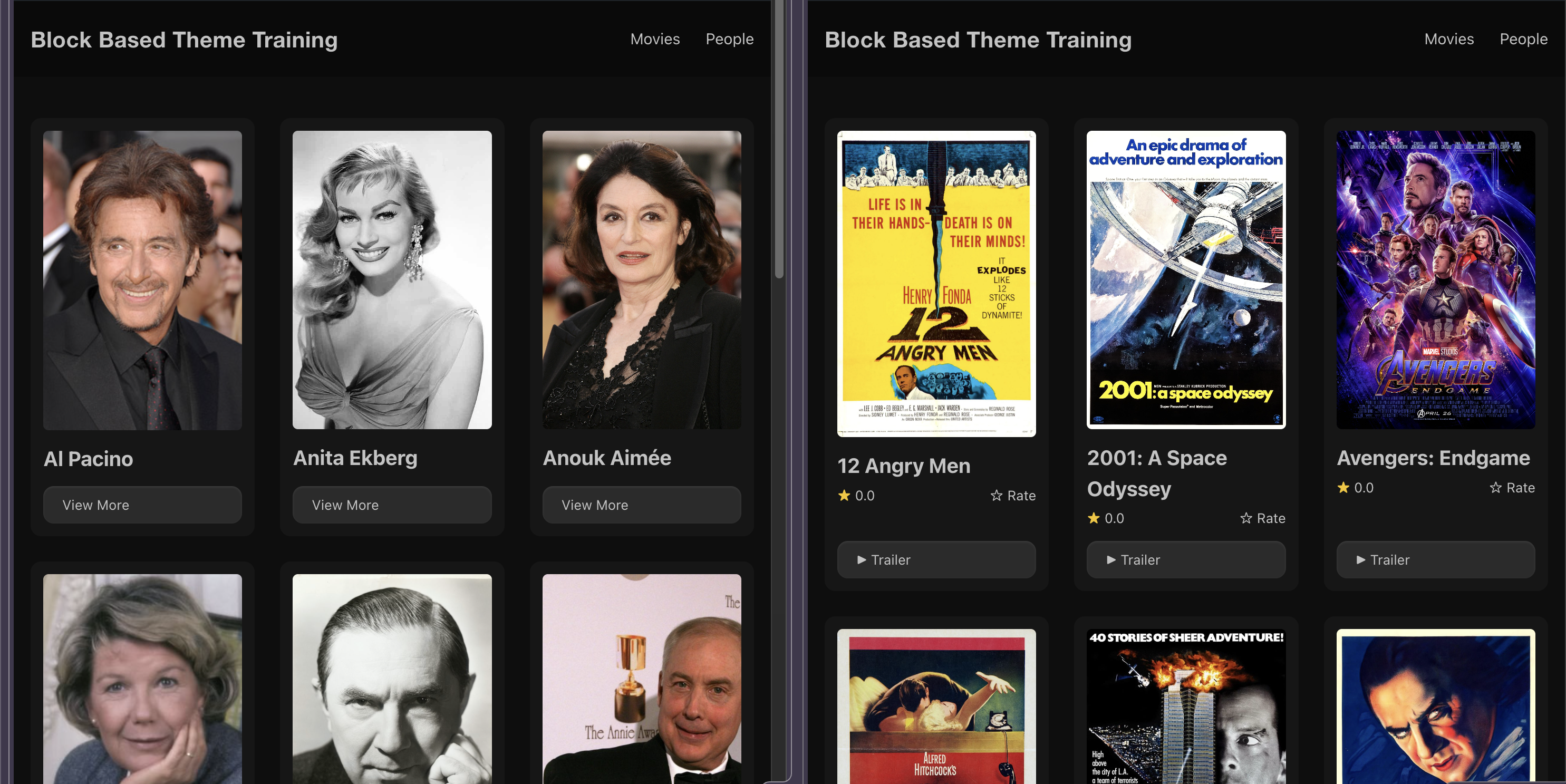 Our Movie and Person cards side by side
How patterns work in templates
When a template references a pattern via <!-- wp:pattern {"slug":"..."} /-->, the pattern's PHP file re-executes on every page load. This is different from patterns inserted into posts, which are copied and detached.
This means:
- Changes to the pattern file propagate immediately to all templates that reference it
- PHP conditionals run in context (the current post type, post ID, etc.)
- No need to re-save posts after changing the pattern
Because patterns are PHP files, you can use any PHP logic: conditional rendering, get_post_meta(), get_template_directory_uri() for asset paths, get_post_type() for post-type-aware behavior. The only rule is that the output must be valid block markup.
Pattern metadata reference
The PHP file header tells WordPress about the pattern:
<?php
/**
 * Title: Base Card
 * Slug: tenup-theme/base-card
 * Description: A card pattern with a featured image, title, and contextual metadata.
 * Inserter: false
 */
Inserter: false hides the pattern from the inserter while keeping it usable via <!-- wp:pattern --> references. Use this for structural patterns that only make sense in a specific template context.
Notes
- Cards in the archive editor won't match the frontend perfectly because
wp_templateis the post context in the editor, not individual movies/people. This is a known limitation worth calling out. - The card pattern includes a viewer rating row using the
viewerRatingLabelTextNumberOnlybinding for movie cards. This binding doesn't exist until Lesson 10, so it will show empty until then.
Files changed in this lesson
| File | Change type | What changes |
|---|---|---|
templates/archive-tenup-movie.html | Modified | Removed placeholder heading, updated grid column width and query order |
templates/archive-tenup-person.html | Modified | Same changes as movie archive |
patterns/card.php | Modified | Shared card layout with conditional inner content based on get_post_type() |
To sync your theme with the finished product, run these commands:
cp themes/fueled-movies/templates/archive-tenup-movie.html themes/10up-block-theme/templates/archive-tenup-movie.html
cp themes/fueled-movies/templates/archive-tenup-person.html themes/10up-block-theme/templates/archive-tenup-person.html
cp themes/fueled-movies/patterns/card.php themes/10up-block-theme/patterns/card.php
Ship it checkpoint
/movies/shows a poster grid of movies/people/shows a poster grid of people- All archives use the same
base-cardpattern
We haven't touched the blog index template yet. The scaffold's templates/index.html already references the base-card pattern and has a working query loop with pagination, so it works out of the box.
If you'd like to make it your own, open it in the Site Editor and experiment. Add a heading, tweak the grid column width, change the query type to custom and use one of our new post types... This is your template, do whatever you want with it.
Takeaways
- Archive templates compose a Query Loop with a pattern reference for the card.
- Patterns referenced via
<!-- wp:pattern -->re-execute on every page load, staying in sync with the source file. - PHP conditionals in patterns let one card pattern adapt to multiple post types.
Inserter: falsehides structural patterns from the inserter while keeping them usable in templates.- The
is-clickable-cardclass and heading link work together for accessible card interactions.